Quest Data Modeler lets you reuse existing models that are stored locally as JSON files or managed centrally in the Mart. This topic describes how to open a model using either method.
You can reuse existing models in two ways:
-
Open a model from a JSON file:
Use this method when models are shared between environments, used outside a central repository, or needed for offline work.
-
Open a model from Mart
Use this method when models are centrally managed and shared across teams. The Mart is a shared repository where models are stored, versioned, and access-controlled.
Each method supports a different stage of the modeling lifecycle, from individual exploration to enterprise‑level collaboration.
Open a model from a JSON file
To open a locally saved model:
-
On the Quest Data Modeler Overview page, under Quick Actions, select Open Model.
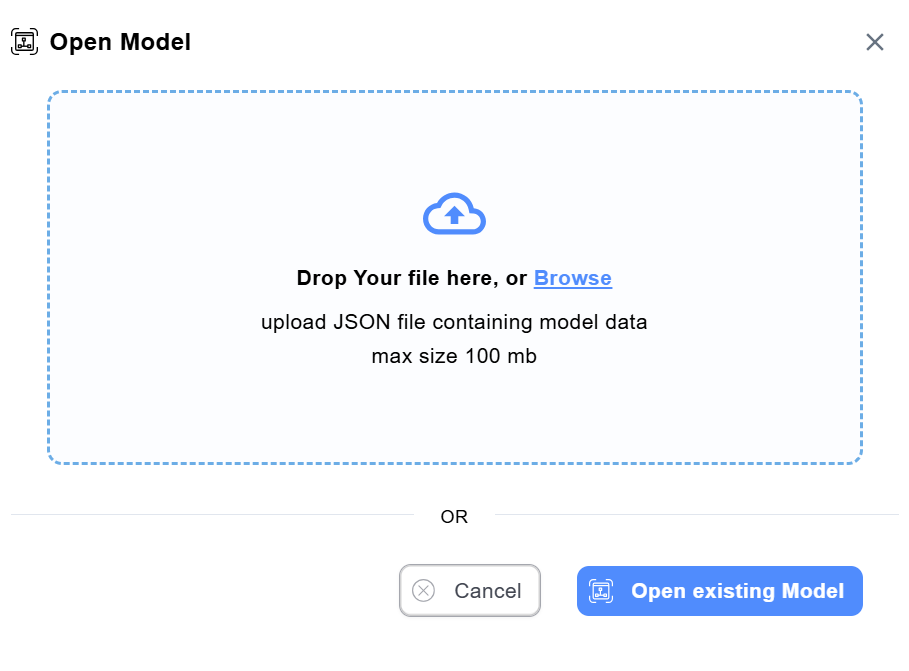
The Open Model dialog opens.
-
Drag and drop the JSON file into the dialog, or select Browse to locate and upload the file. You can also select Open existing model to choose from the list of recent models available in the application.
-
Verify that the model loads successfully in the modeling canvas.
-
Add, update, or remove model objects as needed.
Open a model from the Mart
To open a model from the Mart:
-
On the Quest Data Modeler Overview page, under Quick Actions, select Open Mart Model.
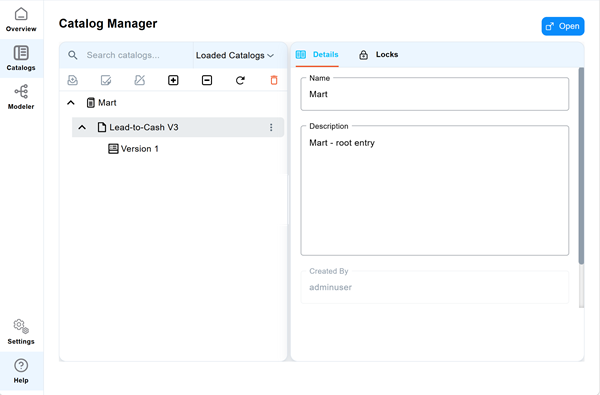
The Catalog Manager page opens.
-
Select the model you want to work on, and then select Open.
-
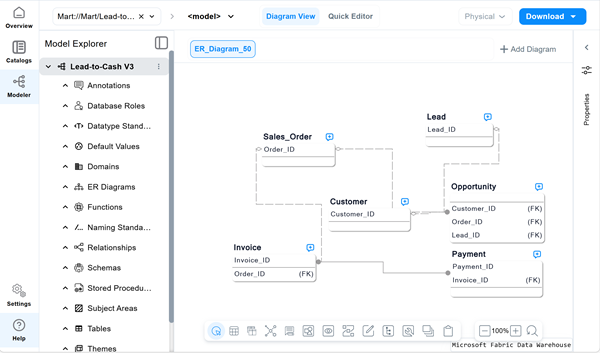
Verify that the model loads successfully in the modeling canvas.
-
Add, update, or remove model objects as needed.