Quest Data Modeler (QDM) lets you export your models as RDF (Resource Description Framework) and Turtle (TTL) files. This capability adds business meaning to your existing data models so that knowledge graphs, semantic tools, governance platforms, and AI agents can use them directly.
Generally, QDM captures database structure—tables, columns, keys, data types, and relationships—and exports that structure as JSON, or similar formats. With RDF/TTL export, the same model becomes a semantic asset. Each foreign key becomes a named, business-meaningful relationship instead of a plain reference.
In QDM, RDF/TTL export produces two kinds of files:
- RDF/TTL Ontology File (*.ttl): A file that defines the structure, vocabulary, and semantics of a domain. It contains classes and datatype properties that represent your model's entities and attributes. Basically, the ontology files capture your model's business ontology. In an Ontology File, each entity in the model becomes an owl:Class that represents a business concept, and each attribute becomes an owl:DatatypeProperty tied to that concept. Instead of authoring an ontology separately, you generate it directly from the model you already maintain, and you can generate matching validation constraints the same way.
-
RDF/TTL Constraint File (*.ttl): A file generated in constraint mode that converts attribute metadata—such as requiredness, data type, and cardinality—into SHACL-style shape constraints. Basically, the constraint files capture validation rules for ontology.
Why Use RDF/TTL Export
RDF/TTL export extends traditional data modeling by adding semantic context that supports governance, interoperability, and AI use cases.
|
Traditional Data Modeling |
Data Modeling with RDF/TTL |
|---|---|
|
Database design |
Database design plus business knowledge |
|
SQL generation |
Knowledge graph generation |
|
Used by database administrators |
Used by database administrators, governance teams, and AI agents |
|
Foreign keys |
Semantic relationships |
|
Human-readable models |
Machine-understandable context |
When you use RDF/TTL export, you get these benefits:
-
Existing data models become a foundation for enterprise knowledge graphs.
-
Business definitions and relationships are reused by semantic tools instead of being recreated manually.
-
AI agents gain structured context about entities such as Customer, Product, Order, and Store, which improves the accuracy of generated answers and reduces incorrect assumptions.
-
Integration with governance platforms and semantic technologies is easier because RDF/TTL is an open standard.
-
Your organization can build graph-based applications while continuing to use QDM as the primary modeling environment.
Reuse a Shared Ontology Vocabulary Across Models
Because RDF/TTL export follows a consistent naming pattern, models that export the same business concept produce matching ontology classes. For example, a Customer entity in one model and a Customer entity in another both export as erm:Customer. When these exports are ingested into the same semantic tool, catalog, or knowledge graph, the tool recognizes them as the same business concept instead of two unrelated definitions.
This means you do not need to author or link an ontology separately for every model. Instead, each model contributes to a shared, growing semantic vocabulary simply by using consistent entity and attribute names, and by exporting as RDF/TTL.
Export a Model as RDF/TTL
In this walkthrough, you export a model as an RDF/TTL file directly from the Modeler workspace.
Follow these steps to export a model as RDF/TTL:
- Open a model.
- On the Modeler screen, select Downloadfrom the upper-right corner.
A drop-down list of available export formats opens.
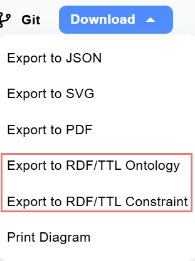
- From the drop-down list, select the RDF/TTL format you want to download.
The download begins automatically, and the TTL file is saved to your computer.
The export generates a standards-based TTL file that any RDF-compliant tool can read.
To use the model, import the exported TTL file into your target semantic platform. Because the output follows standard RDF/TTL specifications, no proprietary connectors are required, making it easy to move and reuse the model across RDF-compliant tools and environments.
The following scenarios show how AI agents and semantic tools use exported RDF/TTL to solve real enterprise problems. Each scenario includes two approaches:
-
An AI-agent-driven approach, where an AI agent parses the exported RDF/TTL and performs additional reasoning or automation.
-
A direct ingestion approach, where semantic tooling or CI pipelines consume the exported RDF/TTL without an intermediate AI agent.
Scenario A: Enterprise Data Catalog Onboarding
Consider a scenario when your organization needs to onboard model semantics into an enterprise data catalog or knowledge graph.
Problem: Data governance teams struggle to ingest ER model semantics into RDF-based catalog and knowledge graph tools because model metadata is trapped in proprietary formats.
Solution: You export the model as an RDF/TTL Ontology File. The exported file includes classes and datatype properties that represent your model's entities and attributes.
Tip: Because exported classes follow a consistent naming pattern, governance teams can treat the exported ontology as a canonical business vocabulary. Re-export other models as RDF/TTL Ontology Files to extend the same shared vocabulary instead of redefining business terms for each model.
Approach 1: AI Agent Enrichment
In this approach, an AI agent parses the exported RDF/TTL Ontology File and enriches your enterprise catalog automatically.
- The architect opens the model in QDM, selects Download in the top-right corner of the Modeler screen, and downloads the model as an RDF/TTL Ontology File, then provides it to the AI agent.
- The AI agent parses the exported classes and properties.
- The AI agent links business glossary terms to the parsed classes and properties, and flags any gaps it finds.
- The catalog is automatically enriched with the linked terms and flagged gaps.
Example output:
	erm:Customer a owl:Class ;
	rdfs:label "Customer" .
Approach 2: Direct Ingestion by Semantic Tooling
In this approach, semantic tooling ingests the exported RDF/TTL Ontology File directly, without an AI agent as an intermediary.
To get an RDF/TTL Ontology File, follow these steps:
- Open the model you want to export in QDM.
- On the Modeler screen, select Download in the top-right corner, and then select the RDF/TTL Ontology File format. The model downloads automatically.
- Review the output. It includes an owl:Class entry for each entity and an owl:DatatypeProperty entry for each attribute.
Then, your catalog pipeline ingests the TTL file and automatically links terms to your enterprise ontology. Your governance team queries lineage and definitions across systems using the enriched catalog.
Example output:
	erm:customer_address a owl:DatatypeProperty ;
		rdfs:domain erm:Customer ;
		rdfs:range xsd:string.
Scenario B: Pre-Deployment Contract Validation
Consider a scenario when your team needs to validate data contracts, such as required fields and cardinality, before deploying a model-backed schema.
Problem: Teams deploying JSON, OpenAPI, or BigQuery-backed models often miss requiredness and cardinality constraints, which causes runtime validation failures.
Solution: You export the model using constraint mode and generate the RDF/TTL Constraint File. Constraint mode converts attribute metadata, such as requiredness and data type, into shape constraints.
Approach 1: AI Agent Generated Validation Tests
In this approach, an AI agent reads the semantic constraints in the exported RDF/TTL Constraint File and generates validation tests for your CI pipeline.
- Open the model, select Download in the top-right corner of the Modeler screen, and select the RDF/TTL Constraint File format to export the model.
- The AI agent extracts required fields and data types from the exported constraints.
- The AI agent generates positive and negative test payloads based on the extracted constraints.
- Your CI pipeline validates the contracts using the generated payloads before release.
Example output:
	erm:OrderShape a sh:NodeShape ;
	sh:targetClass erm:Order.
Approach 2: Direct Constraint Ingestion in CI
In this approach, your CI pipeline ingests the generated shape constraints directly, without an AI agent generating the test payloads.
- Model a BigQuery, OpenAPI, or similar entity that includes array fields and required fields.
- Open the model.
- Select Download in the upper-right corner of the Modeler screen.
- Select the RDF/TTL Constraint File format. The file downloads automatically.
- Review the generated TTL. It encodes cardinality and datatype constraints as sh:minCount, sh:maxCount, and datatype statements.
- Your CI step validates sample payloads against the generated shapes before deployment.
Note: Constraint mode is intended for pre-deployment validation. Review generated shapes against your actual schema requirements before you rely on them in a production CI pipeline.
Key considerations
- Ensure a model is open in the Modeler workspace before you select Download.
- Choose the RDF/TTL Ontology File when you need semantic classes and properties for catalogs or knowledge graphs.
- Choose the RDF/TTL Constraint File when you need to validate requiredness and cardinality before deployment.
- Use consistent entity and attribute names across models so exported classes align to the same shared ontology vocabulary.
- Because RDF/TTL is an open standard, the downloaded file can be imported into any RDF-compliant tool without additional connectors.