Quest Data Modeler (QDM) supports Google BigQuery as a target database. The following sections list the supported data types, database objects, and reverse and forward engineering parameters.
Supported Data Types
 The following data types are supported:
-
BIGNUMERIC
-
BOOLEAN
-
BYTES
-
DATE
-
DATETIME
-
FLOAT64
-
GEOGRAPHY
-
INT64
-
INTERVAL
-
NUMERIC
-
STRING
-
TIME
-
TIMESTAMP
-
JSON
-
RECORD/STRUCT
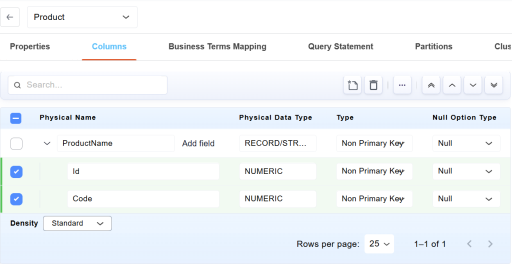
Note: When you set a table column's physical data type to RECORD/STRUCT, the Add field option becomes available. You can use this option to add nested fields. A RECORD/STRUCT type column supports up to 16 levels of nested fields.
The following example shows a RECORD/STRUCT type column with nested fields:
Supported Objects
The following objects are supported in Google BigQuery:
Note: You can use the Ctrl+Z and Ctrl+Y keyboard shortcuts to undo and redo changes in any property field.
Annotations
The following table lists the supported properties for Annotation object:| Tab | Section | Property | Description | Additional Information |
|---|---|---|---|---|
| Properties | Name | Specifies the name of the annotation object | ||
| Type | Specifies the shape used to display the annotation in the diagram | Available shapes include Rectangle, Round Rectangle, Ellipse, Diamond, Hexagon, Pentagon, Star, Triangle, and other supported shapes. | ||
| Physical Only | Indicates whether the annotation is available only in the physical model | When selected, the annotation is displayed only in the physical model view. | ||
| Text | Specifies the content displayed in the annotation | Provides commands to edit annotation text, including Cut, Copy, Paste, Expand, and Spell Check. | ||
| Definition | Specifies the descriptive information associated with the annotation | Provides commands such as Cut, Copy, Paste, Edit, and Spell Check. |
Datasets
The following table lists the supported properties for Dataset object:
| Tab | Section | Property | Description | Additional Information |
|---|---|---|---|---|
| Properties | General Properties | Name | Specifies the name of the dataset | |
| Project | Specifies the project to which the dataset belongs | |||
| If Not Exists | Generates the dataset only if it does not already exist | |||
| Generate | Indicates whether the dataset is included during model generation | |||
| Case Insensitive |
Specifies whether the dataset and the table names are case insensitive |
When selected, name comparisons ignore letter casing. | ||
| Default Collation |
Specifies the default collation specification for the dataset |
|||
| Default Kms Key Name | Specifies the Cloud Key Management Service (KMS) key used by default to encrypt dataset resources | |||
| Default Partition Expiration in Days | Specifies the default expiration period, in days, for partitions created in partitioned tables within the dataset | |||
| Default Table Expiration in Days | Specifies the default expiration period, in days, for tables created in the dataset. | |||
| Friendly Name | Specifies a user-friendly display name for the dataset | |||
| Location | Specifies the geographic location where the dataset is created and stored | |||
| Max Time Travel Hours | Specifies the maximum time-travel retention period, in hours, available for accessing historical versions of data | |||
| Storage Billing Model | Specifies the storage billing model used for the dataset | |||
| Label List | Key | Specifies the label key that identifies a dataset attribute | ||
| Value | Specifies the value assigned to the label key |
Datatype Standards
The following table lists the supported properties for Datatype Standard object:
| Tab | Section | Property | Description | Additional Information |
|---|---|---|---|---|
| Properties | Name | Specifies the name of the datatype standard | ||
| Is Active | Indicates whether the datatype standard is active and available for use | |||
| Logical Definition | Specifies the logical datatypes defined in the datatype standard, including their domains and supported datatype attributes |
|
||
| Mapping | Name | Specifies the name of the datatype mapping |
Click |
|
| From | Specifies the source datatype used in the mapping | |||
| To | Specifies the target datatype associated with the source datatype | |||
| Definition | Specifies descriptive information associated with the datatype standard | Provides commands to edit definition text, including Cut, Copy, Paste, Expand, and Spell Check. |
 (Mapping Editor) to open the Mapping Editor and manage datatype mappings.
Domains
The following table lists the supported properties for Domain object:
| Tab | Section | Property | Description | Additional Information |
|---|---|---|---|---|
| Properties | Domain Parent | Specifies the parent domain from which the current domain inherits properties | ||
| Name | Specifies the name of the domain | |||
| Physical Name | Specifies the physical name of the domain in the target database | |||
| Harden Strategy | Specifies how inherited domain properties are applied to child objects |
Inherit: Uses inherited domain properties. Override: Allows inherited properties to be modified. Harden: Makes inherited properties fixed and non-editable. |
||
| Domain Parent | Specifies the parent domain associated with the current domain | |||
| Physical Data Type | Specifies the physical datatype assigned to the domain | |||
| Null Option | Specifies whether the domain allows null values | |||
| Physical Only | Indicates whether the domain is available only in the physical model | |||
| Constraint | Check Constraints | Use Inherited Constraint | Indicates whether to use the constraint inherited from the parent domain | |
| Name | Specifies the name of the check constraint | Available only when Use Inherited Constraint is not selected. | ||
| Validation | Specifies the validation expression for the check constraint | |||
| Default | Use Inherited Default Value | Indicates whether to use the default value inherited from the parent domain | ||
| Name | Specifies the name of the default value definition | Available only when Use Inherited Default Value is not selected. | ||
| Default | Specifies the default value assigned to the domain | |||
| Definition | Specifies descriptive information associated with the domain | Provides commands to edit definition text, including Cut, Copy, Paste, Restore inheritance from Definition, Edit, and Spell Check. |
ER Diagrams
The following table lists the supported properties for ER Diagram object:
| Tab | Section | Property | Description | Additional Properties |
|---|---|---|---|---|
| Properties | Properties | Name | Specifies the name of the ER diagram | |
| Logical Physical View Mode | Specifies whether the diagram is displayed in logical or physical view. |
Logical: Displays logical model elements. Physical: Displays physical database elements. |
||
| Auto-populate | Indicates whether objects are automatically added to the diagram | |||
| General | General Options | Author | Specifies the author of the diagram | |
| Optional Theme | Theme | Specifies the theme applied to the diagram |
Classic Theme: Specifies standard visual styling. DARK Theme: Specifies dark theme styling. Default Theme: Specifies system default theme. |
|
| Optional override to theme background fill | Fill Options | Specifies background fill settings for the diagram | ||
| Members | Available Objects | Name | Specifies the name of the available object | |
| Type | Indicates the type of the object | |||
| Included Objects | Name | Specifies the name of the included object in the diagram | ||
| Type | Indicates the type of the included object | |||
| Relationships | Available Relationships | Name | Specifies the name of the relationship | |
| Type | Indicates the type of the relationship | |||
| Parent | Specifies the parent object in the relationship | |||
| Child | Specifies the child object in the relationship | |||
| Included Relationships | Name | Specifies the name of the included relationship | ||
| Type | Indicates the type of the relationship | |||
| Parent | Specifies the parent object in the relationship | |||
| Child | Specifies the child object in the relationship | |||
| Layout | Manual Layout | Allow Manual Relationship Layout | Indicates whether relationship lines can be manually arranged | |
| Allow Manual Entity Resizing | Indicates whether entities can be resized manually | |||
| Grid Alignment | Align Objects to Grid | Indicates whether objects snap to the grid | ||
| Alignment Grid Spacing | Specifies the spacing between grid lines | |||
| Align Grid Color | Specifies the color of the alignment grid | |||
| Visual Cues | Show Page Grid | Indicates whether the page grid is displayed in the diagram | ||
| Show Background | Indicates whether the diagram background is displayed | |||
| Show Callout | Indicates whether callouts are displayed | |||
| Selection Grips Color | Specifies the color of selection handles | |||
| Display | Shadow | Display Shadows | Indicates whether shadows are applied to objects | |
| Shadow Offset - Right | Specifies the horizontal and vertical shadow offset | |||
| Shadow Offset - Bottom | Specifies the horizontal and vertical shadow offset | |||
| Display Length | Definition and Comment Display Length | Specifies the maximum length of displayed definitions and comments | ||
| View Expression Display Length | Specifies the maximum length of displayed expressions | |||
| Relationship Display | Relationship Line Orientation | Specifies how relationship lines are displayed | ||
| Display Dangling Relationships | Indicates whether incomplete relationships are displayed | |||
| Split Verb Phrase | Indicates whether verb phrases are split across relationship directions | |||
| Display Child-To-Parent Verb Phrase | Indicates whether child-to-parent verb phrases are displayed | |||
| Display Parent-To-Child Verb Phrase | Indicates whether parent-to-child verb phrases are displayed | |||
| Display Subcategory Cardinality | Indicates whether subtype cardinality is displayed | |||
| Preferences | Display Lines on top | Indicates whether lines are drawn above diagram objects | ||
| Entity | Display Level | Logical Display Level | Specifies the level of detail displayed for entities | |
| Entity Display Options | Show Attributes/Columns as Grid | Indicates whether attributes are displayed in grid format | ||
| Display Rolenames | Indicates whether role names are displayed | |||
| Display Attribute Data Type | Indicates whether attribute data types are displayed | |||
| Display Attribute Domain | Indicates whether domains are displayed | |||
| Display Attribute Null Option | Indicates whether nullability is displayed | |||
| Display Attribute SDI Option | Indicates whether SDI information is displayed | |||
| Display Physical Name | Indicates whether physical names are shown | |||
| Display Logical Primary Key (PK) Designator | Indicates whether key designators are displayed | |||
| Display Logical Foreign Key (FK) Designator | ||||
| Display Logical Alternate Key (AK) Designator | ||||
| Display Migrated Attributes | Indicates whether migrated attributes are shown | |||
| Display Attribute Icon | Indicates whether icons are displayed | |||
| Display Entity Icon | ||||
| Table | Display Level | Physical Display Level | Specifies the level of detail displayed for tables | |
| Table Display Options | Show Attributes/Columns as Grid | Indicates whether columns are displayed in grid format | ||
| Display Column Data Type | Indicates whether column properties are displayed | |||
| Display Column Domain | ||||
| Display Column Null Option | ||||
| Display Column SDI Option | ||||
| Display Logical Name | Indicates whether logical names are displayed | |||
| Display Physical Primary Key (PK) Designator | Indicates whether key designators are displayed | |||
| Display Physical Foreign Key (FK) Designator | ||||
| Display Physical Alternate Key (AK) Designator | ||||
| Display Owner | Indicates whether ownership details are displayed | |||
| Display Owner For Non Current Users | ||||
| Display Ungenerated Tables | Indicates whether ungenerated objects are displayed | |||
| Display Ungenerated Indexes | ||||
| View | View Display Options | Display Views | Indicates whether views are displayed | |
| Display View Simple Mode | Indicates whether simplified view mode is used. | |||
| Display View Relationships | Indicates whether view relationships are displayed | |||
| Display View Column Expression | Indicates whether view column properties are displayed | |||
| Display View Column Data Type | ||||
| Display View Column Null Option | ||||
| Display Ungenerated Views | Indicates whether ungenerated views are displayed | |||
| Relationship | Relationship Display Options | Display Relationships | Indicates whether relationships are displayed. | |
| Relationship Logical Display Options | Display Logical Relationship Name | Indicates whether relationship names are displayed. | ||
| Display Logical Cardinality | Indicates whether cardinality is displayed. | |||
| Display Logical Referential Integrity | Indicates whether integrity constraints are shown | |||
| Display Subtype Discriminator | Indicates whether subtype discriminator is shown | |||
| Relationship Physical Display Options | Display Physical Relationship Name | Indicates whether relationship names are displayed | ||
| Display Physical Cardinality | Indicates whether cardinality is displayed | |||
| Display Physical Referential Integrity | Indicates whether integrity constraints are shown | |||
| Display Ungenerated Relationships | Indicates whether ungenerated relationships are displayed | |||
| Page Setup | Page Size | Paper Size | Specifies the paper size | |
| Print Orientation | Specifies the orientation of the printed diagram |
Portrait: Prints in vertical orientation Landscape: Prints in horizontal orientation. |
||
| Print Scaling | Specifies scaling applied during printing | |||
| Miscellaneous | Print Border | Indicates whether borders are printed | ||
| Print In Color | Indicates whether the diagram is printed in color | |||
| Page Setup Margins | Margins (inches) | Footer | Specifies the footer margin settings | |
| Header | Specifies the header margin settings | |||
| Margins (inches) | Top Margin | Specifies the top margin | ||
| Header Margin | Specifies the header margin | |||
| Left Margin | Specifies the left margin | |||
| Right Margin | Specifies the right margin | |||
| Footer Margin | Specifies the footer margin | |||
| Bottom Margin | Specifies the bottom margin | |||
| Definition | Specifies the detailed description or purpose of the diagram |
Provides commands such as Cut, Copy, Paste, Restore inheritance from Definition, Edit, and Spell Check. Select |
 to open the Definition Editor. Select Save to apply changes or Cancel to discard changes.
Functions
The following table lists the supported properties for Function object:
| Tab | Section | Property | Description | Additional Information |
|---|---|---|---|---|
| Properties | User Defined Context | Key | Specifies a user-defined context key associated with the function | |
| Value | Specifies the value associated with the user-defined context key | |||
| General Property | Name | Specifies the name of the function | ||
| Dataset | Specifies the dataset that contains the function | |||
| Project | Specifies the project that contains the function | |||
| If Not Exists | Creates the function only if it does not already exist | |||
| Use Replace Syntax | Indicates whether CREATE OR REPLACE syntax is used during generation | |||
| Aggregate | Indicates whether the function performs aggregate calculations | |||
| Generate | Indicates whether the function is included during model generation | |||
| Function Body | Specifies the SQL or code implementation of the function | |||
| Function Type | Specifies the type of function |
Temp: Creates a temporary function. Table: Returns a table as the result set. Remote: Invokes a remote endpoint or external service. |
||
| Return Data Type | Specifies the datatype returned by the function | |||
| Is Deterministic | Indicates whether the function always returns the same result for identical input values | |||
| Language | Specifies the language used to implement the function | |||
| Function Options | Library | Specifies the external libraries used by the function | ||
| Parameters | Name | Specifies the parameter name | ||
| Physical Data Type | Specifies the datatype assigned to the parameter | |||
| Not Aggregate | Indicates that the parameter is not treated as an aggregate parameter | |||
| Return Table Columns | Return Table Columns | Specifies the columns returned by a table-valued function | ||
| Physical Data Type | Specifies the datatype assigned to the return column | |||
| Expanded | Specifies the SQL definition of the function. |
Provides a built-in editor to view and manage the SQL definition. The following options are available: Fold All / Unfold All – Specifies options to collapse or expand the SQL content Go to Line – Specifies navigation to a specific line in the script Validate – Specifies validation of the SQL syntax Read Only – Indicates whether the SQL editor is in read-only mode SQL – Indicates whether editing mode is enabled |
Materialized Views
The following table lists the supported properties for Materialized View object:
| Tab | Section | Property | Description | Additional Properties |
|---|---|---|---|---|
| Properties | Properties | Name | Specifies the name of the materialized view | |
| Generate | Specifies the name of the materialized view | |||
| Dataset | Specifies the dataset that contains the materialized view | |||
| Project | Specifies the project that contains the materialized view | |||
| If Not Exists | Creates the materialized view only if it does not already exist | |||
| Use Replace Syntax | Indicates whether CREATE OR REPLACE syntax is used during generation | |||
| Allow Non Incremental Definition | Indicates whether non-incremental refresh definitions are allowed | |||
| Enable Refresh | Indicates whether automatic refresh is enabled for the materialized view | |||
| Expiration Timestamp | Specifies the date and time when the materialized view expires | |||
| Friendly Name | Specifies a user-friendly display name for the materialized view | |||
| KMS Key Name | Specifies the Cloud KMS key used to encrypt the materialized view | |||
| Max Staleness | Specifies the maximum acceptable age of cached data | |||
| Refresh Interval Minutes | Specifies the refresh interval, in minutes | |||
| Select Type | Specifies the SELECT clause type used by the materialized view definition |
All: Returns all rows. Distinct: Returns only unique rows. |
||
| Label List | Key | Specifies the label key assigned to the materialized view | ||
| Value | Specifies the value assigned to the label key | |||
| Clustering | Clustering Columns | Column | Specifies the clustering column | |
| Physical Data Type | Specifies the datatype of the clustering column | |||
| Selected | Indicates whether the clustering column is selected | |||
| Partitions | Ingestion Theme Options | Ingestion Options | Specifies ingestion-time partitioning options | |
| Partition Columns | Column | Specifies the partition column | ||
| Physical Data Type | Specifies the datatype of the partition column | |||
| Selected | Indicates whether the partition column is selected | |||
| Partition Expression Options | Scheme | Specifies the partitioning scheme |
DATE: Partitions data by date. TIMESTAMP_TRUNC: Partitions data based on a truncated timestamp value. |
|
| SELECT | Available Tables and Views | Name | Specifies the name of the available table or view | |
| Type | Specifies the object type | |||
| Columns | Name | Specifies the selected column name | ||
| Alias/Column | Specifies the alias or column included in the SELECT statement | |||
| Expression/Value | Specifies the SQL expression or value associated with the column | |||
| Type | Specifies the datatype or expression type | |||
| FROM | Available Tables and Views | Name | Specifies the name of the source table or view | |
| Type | Specifies the source object type | |||
| FROM | Name | Specifies the selected source object | ||
| Alias | Specifies the alias assigned to the source object | |||
| Type | Specifies the source object type | |||
| WHERE | Where Clause | Where | Specifies the filter conditions applied to rows returned by the materialized view | |
| Group By Clause | Group By | Specifies the columns or expressions used to group result sets | ||
| Having Clause | Having | Specifies filter conditions applied to grouped data | ||
| Qualify Clause | Qualify | Specifies filtering conditions applied after window functions are evaluated | ||
| Order By Clause | Order | Specifies the sorting order of the result set | ||
| User Defined SQL | User Defined SQL Statement | Specifies a custom SQL statement used to define the materialized view |
Provides a built-in SQL editor to create and manage custom SQL statements with the following options: Format – Formats the SQL code Undo / Redo – Reverts or reapplies changes Fold All / Unfold All – Collapses or expands SQL content Comment – Adds or removes SQL comments Go to Line – Navigates to a specific line Validate – Validates SQL syntax SQL – Indicates editing mode is enabled |
|
| Definition | Specifies descriptive information associated with the materialized view |
Provides commands such as Cut, Copy, Paste, Expand, and Spell Check. Select |
Naming Standards
The following table lists the supported properties for Naming Standard object:
| Tab | Section | Property | Description | Additional Information |
|---|---|---|---|---|
| Logical | Entity | Specifies the naming standard format for logical entity names |
Prime - Specifies the core noun or primary business term Modifier 1 (M1) - Specifies the first qualifier describing the prime Modifier 2 (M2) - Specifies the second qualifier providing additional context Class (C) - Specifies the type or classification of the object
|
|
| Attribute | Specifies the naming standard format for logical attribute names | |||
| Domain | Specifies the naming standard format for logical domain names | |||
| Physical | Table | Specifies the naming standard format for physical table names | ||
| Column | Specifies the naming standard format for physical column names | |||
| Domain | Specifies the naming standard format for physical domain names | |||
| Glossary | Word/Words | Specifies the business terms used to define naming standards | ||
| Abbreviation | Specifies the standardized abbreviation for a word | |||
| Alt Abbreviation | Specifies an alternate abbreviation for the word | |||
| P, M, M1, M2, C | Indicates the role of the word in the naming structure |
|
||
| Definition | Specifies the description or meaning of the glossary word | |||
| Definition | Specifies the detailed description or purpose of the naming standard |
Provides commands such as Cut, Copy, Paste, Edit, and Spell Check. Select |
 to open the Definition Editor. Select Save to apply changes or Cancel to discard changes.
Relationships
The following table lists the supported properties for Relationship object:
| Tab | Section | Property | Description | Additional Information |
|---|---|---|---|---|
| Properties | Name | Specifies the name of the relationship | ||
| Parent Entity | Specifies the parent entity participating in the relationship | |||
| Child Entity | Specifies the child entity participating in the relationship | |||
| Physical Name | Specifies the physical name used in the database | |||
| Harden Strategy | Specifies how inherited relationship properties are applied |
Inherit: Specifies that properties are inherited from the parent Override: Specifies that inherited properties can be modified Harden: Specifies that inherited properties are fixed |
||
| Generate | Indicates whether the relationship is included during model generation | |||
| Type Properties | Type | Specifies the type of relationship | ||
| Relationship Properties |
Parent-to-Child Phrase |
Specifies the verb phrase describing the relationship from parent to child |
||
|
Child-To-Parent Phrase |
Specifies the verb phrase describing the relationship from child to parent |
|||
| Cardinality Properties | Cardinality | Specifies the relationship cardinality between parent and child entities |
Zero, One, or More: Specifies optional many relationship One or More (P): Specifies mandatory many relationship Zero or One (Z): Specifies optional one relationship |
|
| Cardinality Value | Specifies the numeric representation of the cardinality | |||
| Role Name | Migrated Key/Index | Key Group | Specifies the key group that is migrated through the relationship | |
| Role Name Info | Name | Specifies the role name associated with the relationship | ||
| Type | Specifies the type of role | |||
| Parent | Specifies the parent object associated with the role | |||
| Parent Type | Specifies the type of the parent object | |||
| RI Actions | RI Actions | Child Delete Rule | Specifies the action applied to child records when the parent is deleted |
Restrict: Prevents deletion if dependent records exist Cascade: Deletes dependent child records automatically Set Null: Sets foreign key values to null Set Default: Sets foreign key values to default No Action: Defers constraint handling |
| Child Insert Rule | Specifies the action applied when inserting child records | |||
| Child Update Rule | Specifies the action applied when updating child records | |||
| Parent Delete Rule | Specifies the action applied when deleting parent records | |||
| Parent Insert Rule | Specifies the action applied when inserting parent records | |||
| Parent Update Rule | Specifies the action applied when updating parent records | |||
| Match Option | Specifies the matching behavior for referential integrity |
Match Simple: Specifies simple matching of columns Match Full: Specifies full matching across all columns Match Partial: Specifies partial matching |
||
| Trigger Template | Trigger Template | Child Delete Trigger Template | Specifies the trigger template for child delete operations | |
| Child Insert Trigger Template | Specifies the trigger template for child insert operations | |||
| Child Update Trigger Template | Specifies the trigger template for child update operations | |||
| Parent Delete Trigger Template | Specifies the trigger template for parent delete operations | |||
| Parent Insert Trigger Template | Specifies the trigger template for parent insert operations | |||
| Parent Update Trigger Template | Specifies the trigger template for parent update operations |
Stored Procedures
The following table lists the supported properties for Stored Procedure object:
| Tab | Section | Property | Description | Additional Information |
|---|---|---|---|---|
| Properties | General Properties | Name | Specifies the name of the stored procedure | |
| Dataset | Specifies the dataset that contains the stored procedure | |||
| Project | Specifies the project that contains the stored procedure | |||
| If Not Exists | Creates the stored procedure only if it does not already exist | |||
| Use Replace Syntax | Indicates whether CREATE OR REPLACE syntax is used during generation | |||
| Aggregate | Indicates whether the procedure performs aggregate processing | |||
| Generate | Indicates whether the stored procedure is included in script generation | |||
| Connection Name | Specifies the connection used by the stored procedure | |||
| Language | Specifies the programming language used by the procedure |
Python: Executes the procedure using Python code. Java: Executes the procedure using Java code. Scala: Executes the procedure using Scala code. |
||
| Procedure Body | Specifies the code or statements that define the procedure logic | |||
| Pyspark Code | Specifies the PySpark implementation used by the procedure | |||
| Options | Options | Archive URIs | Specifies archive files required by the procedure | |
| Container Image | Specifies the container image used to execute the procedure | |||
| Engine | Specifies the execution engine used by the procedure | |||
| File URIs | Specifies external files referenced by the procedure | |||
| Jar URIs | Specifies JAR files required by the procedure | |||
| Main Class | Specifies the main class to execute | |||
| Main File URI | Specifies the URI of the main executable file | |||
| Py File URIs | Specifies Python files required by the procedure | |||
| Runtime Version | Specifies the runtime version used to execute the procedure | |||
| Strict mode | Indicates whether strict validation is enforced during execution | |||
| Properties | Key | Specifies a user-defined property key | ||
| Value | Specifies the value associated with the property key | |||
| Parameters | Name | Specifies the parameter name | ||
| Parameter Type | Specifies the parameter direction |
IN: Accepts input values passed to the procedure. OUT: Returns values from the procedure. INOUT: Accepts input values and returns modified values. |
||
| Physical Data Type | Specifies the physical datatype assigned to the parameter |
Tables
The following table lists the supported properties for Table object:
| Tab | Section | Property | Description | Additional Information |
|---|---|---|---|---|
| Properties
|
Table Properties | Name | Specifies the name of the table | |
| Physical Name | Specifies the physical name of the table in the target database | |||
| Harden Strategy | Specifies how inherited properties are applied to the table |
Inherit: Uses inherited properties. Override: Allows inherited properties to be modified. Harden: Makes inherited properties fixed and non-editable. |
||
| If Not Exists | Generates the table only if it does not already exist | |||
| Physical Only | Indicates whether the table is available only in the physical model | |||
| Dataset | Specifies the dataset that contains the table | |||
| Table Type | Specifies the type of table | |||
| Use Replace Syntax | Indicates whether CREATE OR REPLACE syntax is used during generation | |||
| Generate | Indicates whether the table is included during model generation | |||
| General Properties | Default Collation | Specifies the default collation used for string comparison | Available when Table Type is set to Base, or Temp | |
| Default Rounding Mode | Specifies the default rounding behavior for numeric values | Available when Table Type is set to Base, or Clone, or Copy, or Like, or Temp | ||
| Expiration Timestamp | Specifies the date and time when the table expires | Available when Table Type is set to Base, or Clone, or Copy, or External, or Like, or Snapshot, or Temp | ||
| Friendly Name | Specifies a user-friendly display name for the table | Available when Table Type is set to Base, or Clone, or Copy, or Like, or Snapshot, or Temp | ||
| KMS Key Name | Specifies the Cloud KMS key used to encrypt the table | Available when Table Type is set to Base, or Clone, or Copy, or Like, or Temp | ||
| Max Staleness | Specifies the maximum accepted age of cached data | Available when Table Type is set to Base, or Clone, or Copy, or External, or Like, or Temp | ||
| Source Table | Specifies the source table used to create the table | Available when Table Type is set to Clone or Copy, or Like, or Snapshot | ||
| Allow Jagged Rows | Specifies the source table used to create the table | Available when Table Type is set to External. | ||
| Allow Quoted Newlines | Indicates whether quoted fields can contain newline characters | |||
| Bigtable Options | Specifies options used when accessing Bigtable external data | |||
| Compression | Specifies the compression format of source files | |||
| Connection Name | Specifies the connection used to access external data sources | |||
| Decimal Target Types | Specifies the target datatype used for decimal values | |||
| Enable List Inference | Indicates whether array data structures are inferred automatically | |||
| Enable Logical Types | Indicates whether logical types are recognized during data import | |||
| Encoding | Specifies the character encoding of source files | |||
| Enum As String | Indicates whether ENUM values are treated as strings | |||
| Field Delimiter | Specifies the character used to separate fields in source files | |||
| File Set Spec Type | Specifies the file set specification type | |||
| Format | Specifies the format of the source data | |||
| Hive Partition URI Prefix | Specifies the URI prefix used for Hive partition discovery | |||
| Ignore Unknown Values | Indicates whether unknown values are ignored during import | |||
| JSON Extension | Specifies the JSON extension mode used when importing JSON data | |||
| Max Bad Records | Specifies the maximum number of invalid records that are allowed | |||
| Metadata Cache Mode | Specifies the metadata caching behavior | |||
| Null Marker | Specifies the value used to represent NULL values in source data | |||
| Object Metadata | Specifies metadata associated with external objects | |||
| Preserve Ascii Control Characters | Indicates whether ASCII control characters are preserved | |||
| Projection Fields | Specifies projected fields used during query execution | |||
| Quote | Specifies the character used to quote string values | |||
| Reference File Schema URI | Specifies the URI of an external schema definition file | |||
| Require Hive Partition Filter | Indicates whether partition filters are required for queries | |||
| Sheet Range | Specifies the worksheet range used for spreadsheet sources | |||
| Skip Leading Rows | Specifies the number of rows skipped before data is imported | |||
| URIs | Specifies the source URI locations associated with the table | |||
| System Time | Specifies the point-in-time snapshot reference | Available when Table Type is set Snapshot. | ||
| Label List | Key | Specifies the label key assigned to the table | ||
| Value | Specifies the value assigned to the label key | |||
| Columns | Name | Specifies the name of the column | ||
| Physical Data Type | Specifies the datatype assigned to the column | |||
| Type | Specifies the column type | |||
| Null Option Type | Specifies whether NULL values are allowed for the column | |||
| Query Statement | Specifies the SQL statement used to define the table | |||
| Partitions | Partition Columns | Column | Specifies the partition column | |
| Physical Data Type | Specifies the datatype of the partition column | |||
| Selected | Indicates whether the partition column is selected | |||
| Ingestion Time Options | Ingestion Options | Specifies ingestion-time partitioning options | ||
| Options | Partition Expiration in Days | Specifies the number of days before partitions expire | ||
| Require Partition Filter | Indicates whether queries must include a partition filter | |||
| Partition Expression Options | Schema | Specifies the partitioning schema | ||
| Start | Specifies the starting value for partition ranges | |||
| End | Specifies the ending value for partition ranges | |||
| Interval | Specifies the interval used between partition ranges | |||
| Clustering | Clustering Columns | Column | Specifies the clustering column | |
| Physical Data Type | Specifies the datatype of the clustering column | |||
| Selected | Indicates whether the clustering column is selected |
Child Relations
The following table lists the supported properties for Child Relation object:
| Tab | Section | Property | Description | Additional Information |
|---|---|---|---|---|
| Name | Specifies the name of the relationship | |||
| Parent Entity | Specifies the parent entity or table participating in the relationship | |||
| Child Entity | Specifies the child entity or table participating in the relationship | |||
| Physical Name | Specifies the physical name of the relationship in the target database | |||
| Harden Strategy | Specifies how inherited relationship properties are applied |
Inherit: Uses inherited relationship properties. Override: Allows inherited properties to be modified. Harden: Makes inherited properties fixed and non-editable. |
||
| Generate | Indicates whether the relationship is included during model generation | |||
| Type Properties | Type | Specifies the type of relationship | ||
| Relationship Properties | Parent-to-Child Phrase | Specifies the verb phrase describing the relationship from the parent object to the child object | ||
| Child-To-Parent Phrase | Specifies the verb phrase describing the relationship from the child object to the parent object | |||
| Cardinality Properties | Cardinality | Specifies the cardinality between the parent and child objects |
Zero, One, or More: Specifies an optional many relationship. One or More (P): Specifies a mandatory many relationship. Zero or One (Z): Specifies an optional one relationship. |
|
| Cardinality Value | Specifies the numeric representation of the selected cardinality | |||
| Role Name | Migrated Key/index | Key Group | Specifies the key group migrated through the relationship | |
| Role Name Info | Migrated Attribute | Specifies the attribute migrated through the relationship | ||
| Logical Role Name | Specifies the logical role name assigned to the relationship | |||
| Physical Role Name | Specifies the physical role name assigned to the relationship | |||
| RI Actions | RI Actions | Child Delete Rule | Specifies the action applied to child records when related parent records are deleted | |
| Parent Insert Rule | Specifies the action applied when parent records are inserted | |||
| Match_Option | Specifies the matching behavior used for referential integrity validation |
Match Simple: Evaluates columns independently. Match Full: Requires all columns in the foreign key to satisfy the constraint. Match Partial: Allows partial column matching for composite keys. |
||
| Trigger Template | Child Delete Trigger Template | Specifies the trigger template used for child delete operations | ||
| Child Insert Trigger Template | Specifies the trigger template used for child insert operations | |||
| Child Update Trigger Template | Specifies the trigger template used for child update operations | |||
| Parent Delete Trigger Template | Specifies the trigger template used for parent delete operations | |||
| Parent Insert Trigger Template | Specifies the trigger template used for parent insert operations | |||
| Parent Update Trigger Template | Specifies the trigger template used for parent update operations |
Columns
The following table lists the supported properties for Table Column object:
| Tab | Section | Property | Description | Additional Information |
|---|---|---|---|---|
| Properties | Properties | Primary Key | Indicates whether the column participates in the table's primary key | |
| Foreign Key | Indicates whether the column participates in a foreign key relationship | |||
| Physical Only | Indicates whether the column is available only in the physical model | |||
| SDI | Specifies the SDI metadata associated with the column | |||
| Domain | Specifies the domain assigned to the column | Inherited domain properties can be applied to the column | ||
| General Options | Name | Specifies the name of the column | ||
| Physical Name | Specifies the physical name of the column in the target database | |||
| Harden Strategy | Specifies how inherited properties are applied to the column | |||
| Physical Data Type | Specifies the physical datatype assigned to the column | |||
| Image | Specifies whether the column stores image data | |||
| Default Expression | Specifies the default value or expression assigned to the column | |||
| Default Rounding Mode | Specifies the rounding behavior used for numeric values | |||
| Mode | Specifies the storage mode of the column |
Nullable: Allows the column to contain NULL values. Repeated/Array: Allows the column to store multiple values as an array. Required: Requires a value for every row; NULL values are not allowed. |
Indexes
The following table lists the supported properties for Index object:
| Tab | Section | Property | Description | Additional Information |
|---|---|---|---|---|
| Properties | Name | Specifies the name of the index | ||
| Physical Name | Specifies the physical name of the index in the target database | |||
| Type | Specifies the index type | The available index types depend on the database platform. | ||
| Is Unique | Indicates whether the index enforces uniqueness on the indexed column values | When selected, duplicate values are not allowed. | ||
| Physical Only | Indicates whether the index exists only in the physical model | When selected, the index is not available in the logical model. | ||
| Members | Index Members | Column | Specifies the column that participates in the index | Lists the columns included in the index definition. |
Parent Relations
The following table lists the supported properties for Parent Relation object:
| Tab | Section | Property | Description | Additional Information |
|---|---|---|---|---|
| Properties | Name | Specifies the name of the relationship | ||
| Parent Entity | Specifies the parent entity or table participating in the relationship | |||
| Child Entity | Specifies the child entity or table participating in the relationship | |||
| Physical Name | Specifies the physical name of the relationship in the target database | |||
| Harden Strategy | Specifies how inherited relationship properties are applied | |||
| Generate | Indicates whether the relationship is included during model generation | |||
| Type Properties | Type | Specifies the type of relationship | ||
| Relationship Properties | Parent-to-Child Phrase | Specifies the verb phrase that describes the relationship from the parent object to the child object | ||
| Child-To-Parent Phrase | Specifies the verb phrase that describes the relationship from the child object to the parent object | |||
| Cardinality Properties | Cardinality | Specifies the cardinality between the parent and child objects | ||
| Cardinality Value | Specifies the numeric representation of the selected cardinality | |||
| Role Name | Migrated key/Index Role Name Info | key Group | Specifies the key group that is migrated from the parent object to the child object | |
| Migrated Attribute | Specifies the attribute that is migrated through the relationship | |||
| Logical Role Name | Specifies the logical role name assigned to the relationship | |||
| Physical Role Name | Specifies the physical role name assigned to the relationship | |||
| RI Actions | Child Delete Rule | Specifies the acton applied to child records when the parent record is deleted | ||
| Child Insert Rule | Specifies the action applied when child records are inserted | |||
| Child Update Rule | Specifies the action applied when child records are updated | |||
| Parent Delete Rule | Specifies the action applied when parent records are deleted | |||
| Parent Insert Rule | Specifies the action applied when parent records are inserted | |||
| Parent Update Rule | Specifies the action applied when parent records are updated | |||
| Match_Option | Specifies the matching behavior used for referential integrity validation | |||
| Trigger Template | Child Delete Trigger Template | Specifies the trigger template used for child delete operations | ||
| Child Insert Trigger Template | Specifies the trigger template used for child insert operations | |||
| Child Update Trigger Template | Specifies the trigger template used for child update operations | |||
| Parent Delete Trigger Template | Specifies the trigger template used for parent delete operations | |||
| Parent Insert Trigger Template | Specifies the trigger template used for parent insert operations | |||
| Parent Update Trigger Template | Specifies the trigger template used for parent update operations |
Row Access Policies
The following table lists the supported properties for Row Access Policy object:
| Tab | Section | Property | Description | Additional Information |
|---|---|---|---|---|
| Properties | Name | Specifies the name of the row access policy | ||
| Filter Expression | Specifies the SQL filter expression used to restrict access to rows in the table | |||
| User | Specifies the user accounts that are granted access through the row access policy | |||
| Group | Specifies the groups that are granted access through the row access policy | |||
| Service Account | Specifies the service accounts that are granted access through the row access policy | |||
| Domain | Specifies the domain whose members are granted access through the row access policy | |||
| All Users | Grants access to all users | |||
| All Authenticated Users | Grants access to all authenticated users |
Themes
The following table lists the supported properties for Theme object:
Note: These properties are applicable to the Classic, Dark, and Default themes. All themes provide the same configuration options for customizing fonts, colors, fill, lines,
| Tab | Section | Property | Description | Additional Information |
|---|---|---|---|---|
| Properties | Name | Specifies the name of the theme | ||
| Diagram Fill | Specifies the background color of the diagram canvas | |||
| Entity Fill | Specifies the background color applied to entity objects | |||
| FK Attribute Font | Specifies the font style applied to foreign key attribute | |||
| FK Attribute Fill | Specifies the fill color for foreign key attributes | |||
| Default Font | Specifies the default font used across the theme | |||
| Entity Font | Specifies the font used for entity names | |||
| Attribute Font | Specifies the font used for attribute names | |||
| Defaults | Font Settings | Font Options | Specifies the default font configuration for diagram elements | |
| Fill Settings | Fill Options | Specifies the default fill color settings | ||
| Line Settings | Line Options | Specifies the line style for relationships and connectors | ||
| Outline Settings | Outline Options | Specifies the border style for diagram objects | ||
| Diagram Fill | Fill Options | Specifies the default background color of the diagram | ||
| Entity | Name Display | Font Options | Specifies the font used to display entity names | |
| Fill Options | Specifies the background color for entity names | |||
| Outline Options | Specifies the border styling for entity name display | |||
| Definition Display | Font Options | Specifies the font used for displaying entity definitions | ||
| Fill Options | Specifies the background color for definitions | |||
| Outline Options | Specifies the border styling for definition sections | |||
| Attribute | Owned Attribute Font | Font Options | Specifies the font applied to owned (non-key) attributes | |
| Foreign Key Style Inheritance | Font Inheritance Type | Specifies whether foreign key attributes inherit font settings | ||
| Color Inheritance Type | Specifies whether foreign key attributes inherit color settings | |||
| Foreign Key Attribute Font | Font Options | Specifies the font used for foreign key attributes | ||
| Foreign Key Attribute Color | Color | Specifies the color applied to foreign key attributes | ||
| Key | Key Display Preference | Style Preference | Specifies how key styles are displayed when multiple key types apply | |
| Alternate Key (AK) Attribute Font | Font Options | Specifies the font used for alternate key attributes | ||
| Inversion Entry (IE) Attribute Font | Font Options | Specifies the font used for inversion entry attributes | ||
| View | Name Display | Font Options | Specifies the font used to display view names | |
| Fill Options | Specifies the background color for view names | |||
| Outline Options | Specifies the border styling for view name display | |||
| Definition Display | Font Options | Specifies the font used for view definitions | ||
| Fill Options | Specifies the background color of the definition section | |||
| Outline Options | Specifies the border styling for the definition section | |||
| Attribute Display Fonts | Font Options (Left / Right panels) | Specifies the font used for displaying attributes within views | ||
| Relationship | Style Inheritance | Relationship Font Inherited From Parent | Indicates whether the relationship text font is inherited from the parent object | |
| Relationship Line Color Inherited From Parent | Indicates whether the relationship line color is inherited from the parent element | |||
| Relationship Text Color Inherited From Line | Indicates whether the relationship text color follows the line color | |||
| Relationship Text Font | Font Options | Specifies the font used for relationship labels | ||
| Relationship Text Color | Color | Specifies the color used for relationship text | ||
| Relationship Line Style | Line Width | Specifies the thickness of relationship lines | ||
| Color | Specifies the color of relationship lines | |||
| Subtype Symbol | Style Inheritance | Subtype Symbol Font Inherited From Parent | Indicates whether subtype symbol font is inherited from the parent | |
| Subtype Symbol Line Color Inherited From Parent | Indicates whether the subtype symbol line color is inherited | |||
| Subtype Symbol Text Color Inherited From Line | Indicates whether subtype symbol text color follows the line color | |||
| Subtype Symbol Text Font | Font Options | Specifies the font used for subtype symbols | ||
| Subtype Symbol Text Color | Color | Specifies the color of subtype symbol text | ||
| Subtype Symbol Style | Line Width | Specifies the thickness of subtype symbol lines | ||
| Color | Specifies the color used for subtype symbol lines | |||
| Fill Options | Specifies the fill color for subtype symbols | |||
| Annotation/Shape | Annotation/Shape Text Font | Font Options | Specifies the font used for annotation and shape text | |
| Annotation/Shape Text Handling | Annotation Text Vertical Alignment | Specifies the vertical alignment of annotation text | ||
| Annotation Text Horizontal Alignment | Specifies the horizontal alignment of annotation text | |||
| Annotation Text Handling Style | Specifies how text is displayed within shapes | |||
| Annotation/Shape Fill | Fill Options | Specifies the background color of annotation or shape objects | ||
| Annotation/Shape Line | Line Options | Specifies the line style used for annotation borders | ||
| Annotation/Shape Outline | Outline Options | Specifies the outline style for annotation shapes | ||
| Definition | Specifies the detailed description or purpose of the naming standard |
Provides commands such as Cut, Copy, Paste, Edit, and Spell Check. Select |
Views
The following table lists the supported properties for View object:
| Tab | Section | Property | Description | Additional Information |
|---|---|---|---|---|
| Properties | Properties | Name | Specifies the name of the view | |
| Dataset | Specifies the dataset that contains the view | |||
| Project | Specifies the project that contains the view | |||
| If Not Exists | Generates the view only if it does not already exist | |||
| Use Replace Syntax | Indicates whether CREATE OR REPLACE syntax is used during generation | |||
| Generate | Indicates whether the view is included during model generation | |||
| Select Type | Specifies the SELECT clause type used by the view definition | Common values include All and Distinct. | ||
| General Properties | Expiration Timestamp | Specifies the date and time when the view expires | ||
| Friendly Name | Specifies a user-friendly display name for the view | |||
| Privacy Policy | Specifies the privacy policy associated with the view | |||
| Label List | Key | Specifies the label key assigned to the view | ||
| Value | Specifies the value assigned to the label key | |||
| SELECT | Select Columns and Expressions | Available Tables and Views | Lists the available tables and views that can be referenced in the view definition | |
| Name | Specifies the name of the selected column or expression | |||
| Type | Specifies the object type of the selected item | |||
| Columns | Lists the available columns for the selected table or view | |||
| Alias/Column | Specifies the alias or column included in the SELECT statement | |||
| Expression/Value | Specifies the SQL expression or value associated with the selected column | |||
| Type | Specifies the datatype or expression type | |||
| FROM | Available Tables and Views | Lists the available tables and views that can be referenced in the view definition | ||
| Name | Specifies the name of the table or view referenced in the FROM clause | |||
| Type | Indicates whether the source object is a table or view | |||
| Name | Specifies the selected source object | |||
| Alias | Specifies the alias assigned to the source object | |||
| Type | Specifies the source object type. | |||
| WHERE | Where | Where | Specifies the filter condition applied to rows returned by the view | |
| Group By | Group By | Specifies the columns or expressions used to group result sets | ||
| Qualify | Qualify | Specifies filtering criteria applied after window functions are evaluated | ||
| Order | Order | Specifies the ordering of rows returned by the view | ||
| User Defined SQL | User Defined SQL Statement | Specifies a custom SQL statement used to define the materialized view |
The SQL editor provides the following options: Format: Formats the SQL statement. Undo / Redo: Reverts or reapplies changes. Fold All / Unfold All: Collapses or expands SQL content. Comment: Adds or removes SQL comments. Go to Line: Navigates to a specified line in the SQL statement. Validate: Validates the SQL syntax. SQL: Enables SQL editing mode. |
To view the common object properties that are supported in Google BigQuery, refer to Common Object Properties.
RE Parameters
The following sections explain the reverse engineering options for Google BigQuery:
Overview
The following table lists the overview parameters:
| Parameter | Description | Additional Information |
|---|---|---|
| Reverse engineer source | Specifies the source used for reverse engineering |
Database: Indicates that the model is reverse engineered from a database Script File: Indicates that the model is reverse engineered from a script file |
| Type | Specifies the type of model to be created | Provides an option to choose the type of model between Physical or Logical/Physical. |
| Database | Specifies the database selected for reverse engineering | |
| Version | Specifies the version of the selected database | |
| Script file | Specifies the script file's location | This option is available when Script File is selected. Select Browse and select a script file from your directory. |
Connection
The following table lists the connection parameters:
| Parameter | Description | Additional Information |
|---|---|---|
| Database | Specifies the database for establishing the connection | |
| Version | Specifies the database version | |
| Authentication | Specifies the authentication method used for connection |
Service Account: Authenticates using a Google Cloud service account JSON key file. OAuth2: Authenticates using Google OAuth 2.0 credentials. Before you select this option, complete the OAuth setup. For more information, refer to the Configure OAuth for Google BigQuery topic. |
| Username | Specifies the username for authentication | |
| Password | Specifies the password for authentication | |
| Connection Type | Specifies the type of connection used to connect to the database | JDBC: Establishes the connection using Java Database Connectivity. |
| Service Account Key File | Specifies the path to the Google Cloud service account key file used for authentication |
Available when Authentication is set to Service Account. Select Browse to and upload the service account JSON key file. |
| Project Id | Specifies the Google Cloud project ID associated with the BigQuery environment |
Available when Authentication is set to OAuth2. Enter the Project ID to enable Google account authentication and access project resources. |
| Google Account | Specifies the Google account used to authenticate with Google BigQuery |
Available when Authentication is set to OAuth2 and after a valid Project Id is specified. Select Connect with Google to authenticate. |
| Client Id | Specifies the OAuth client ID used for authentication |
Available when Authentication is set to OAuth2. Automatically populated after successful Google authentication. |
| Client Secret | Specifies the OAuth client secret associated with the client ID |
Available when Authentication is set to OAuth2. Required to establish an OAuth2 connection. |
| Access Token | Specifies the OAuth access token used for authentication |
Available when Authentication is set to OAuth2. Automatically populated after successful Google authentication. |
| Refresh Token | Specifies the OAuth refresh token used to obtain a new access token |
Available when Authentication is set to OAuth2. Automatically populated after successful Google authentication. |
Projects
The following table lists the project parameters:
| Parameter | Description | Additional Information |
|---|---|---|
| Available Projects | Specifies the Google Cloud projects available for reverse engineering | |
| Selected Projects | Specifies the Google Cloud projects selected for reverse engineering |
Datasets
The following table lists the dataset parameters:
| Parameter | Description | Additional Information |
|---|---|---|
| System Objects | Specifies whether system objects are included under the Available Datasets | |
| Available Datasets | Specifies a list of available datasets | |
| Selected Datasets | Specifies a list of selected datasets for reverse engineering |
Tables
The following table lists the table parameters:
| Parameter | Description | Additional Information |
|---|---|---|
| System Objects | Specifies whether system objects are included under the Available Tables list | |
| Available Tables | Specifies a list of available tables | |
| Selected Tables | Specifies a list of selected tables for reverse engineering |
Views
The following table lists the view parameters:
| Parameter | Description | Additional Information |
|---|---|---|
| Available Views | Specifies a list of available views | |
| Selected Views | Specifies a list of selected views for reverse engineering |
Materialized View
The following table lists the materialized view parameters:
| Parameter | Description | Additional Information |
|---|---|---|
| Available Materialized Views | Specifies a list of available materialized views | |
| Selected Materialized Views | Specifies a list of selected materialized views for reverse engineering |
Options
The following table lists the options parameters:
| Parameter | Description | Additional Information |
|---|---|---|
| Options | Specifies the database object types to include in the reverse engineering process. Select or clear object types such as Datasets, Functions, Materialized Views, Stored Procedures, Tables, and Views as required. |
FE Parameters
The following sections explain the forward engineering options for Google BigQuery.
Option Selection
The following table lists the option selection parameters:
| Parameter | Description | Additional Information |
|---|---|---|
| Object Type | Specifies the type of objects selected for forward engineering | |
| Properties | Specifies the properties associated with the selected object type |
Owner Override
The following table lists the owner override parameters:
| Parameter | Description | Additional Information |
|---|---|---|
| Object Name | Specifies the name of the object for which the owner is overridden | |
| Owner Override | Specifies the owner assigned to the selected object during schema generation |
Object Filter
The following table lists the object filter parameters:
| Parameter | Description | Additional Information |
|---|---|---|
| Object Filter | Specifies the objects selected for schema generation | |
| Select all | Indicates selection of all available objects | |
| Deselect all | Indicates removal of selection from all objects | |
| Invert Selection | Indicates reversal of the current selection | |
| Change display mode | Indicates switching between different object display views | |
| Full Screen | Indicates expansion of the object selection panel to full screen |
Preview
The following table lists the preview parameters:
| Parameter | Description | Additional Information |
|---|---|---|
| Text | Displays the generated SQL or script preview. |
Commit to Git: Commits the FE script to a Git repository. Save: Saves the generated schema. Find: Searches within the generated schema. Print: Prints the generated schema. Copy: Copies the selected text in the schema. Replace: Finds and replaces text in the generated schema. Full Screen: Expands the preview window. |
Connection
The following table lists the connection parameters:| Parameter | Description | Additional Information |
|---|---|---|
| Database | Specifies the database for establishing the connection | |
| Version | Specifies the database version | |
| Authentication | Specifies the authentication method used for connection |
Service Account: Authenticates using a Google Cloud service account JSON key file. OAuth2: Authenticates using Google OAuth 2.0 credentials.Before you select this option, complete the OAuth setup. For more information, refer to the Configure OAuth for Google BigQuery topic. |
| Username | Specifies the username for authentication | |
| Password | Specifies the password for authentication | |
| Connection Type | Specifies the type of connection used to connect to the database | JDBC: Establishes the connection using Java Database Connectivity. |
| Service Account Key File | Specifies the path to the Google Cloud service account key file used for authentication |
Available when Authentication is set to Service Account. Select Browse to and upload the service account JSON key file. |
| Project Id | Specifies the Google Cloud project ID associated with the BigQuery environment |
Available when Authentication is set to OAuth2. Enter the Project ID to enable Google account authentication and access project resources. |
| Google Account | Specifies the Google account used to authenticate with Google BigQuery |
Available when Authentication is set to OAuth2 and after a valid Project Id is specified. Select Connect with Google to authenticate. |
| Client Id | Specifies the OAuth client ID used for authentication |
Available when Authentication is set to OAuth2. Automatically populated after successful Google authentication. |
| Client Secret | Specifies the OAuth client secret associated with the client ID |
Available when Authentication is set to OAuth2. Required to establish an OAuth2 connection. |
| Access Token | Specifies the OAuth access token used for authentication |
Available when Authentication is set to OAuth2. Automatically populated after successful Google authentication. |
| Refresh Token | Specifies the OAuth refresh token used to obtain a new access token |
Available when Authentication is set to OAuth2. Automatically populated after successful Google authentication. |