erwin Mart Portal is a web-based application for centralized model management and collaborative modeling. It integrates with erwin Data Modeler and Quest Data Modeler (QDM), providing a centralized interface for managing and sharing models across teams. The following sections explain the architecture of its on premises and on cloud flavors.
Based on your deployment model, refer to the appropriate section:
erwin Mart Portal on Premises
The architecture follows a JAR-based, multi-product structure and comprises the following components:
- Database
-
Stores the user data for the Workgroup Edition. You can use Oracle, SQL Server, or PostgreSQL databases. You must use a new database and not an existing database that was created for an older version of the data modeling tool. For more information on database versions and other prerequisites, refer to the Reviewing Prerequisites topic.
- Applications
-
Includes a web-based component named erwin Mart Portal that helps you manage it through a web console.
- Web server
-
Hosts erwin Mart Portal. You can use a web server of your choice. If you have not installed a web server, use the erwin Mart Portal option and install Tomcat.
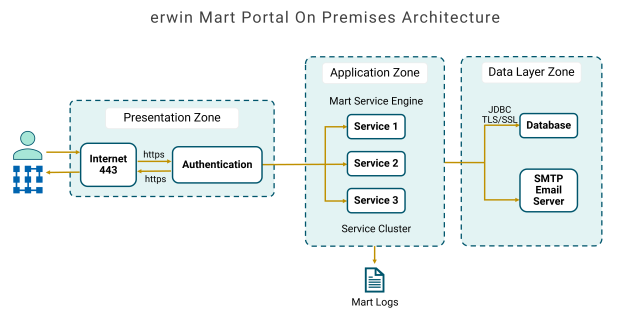
The following diagram explains erwin Mart Portal on premises architecture:
erwin Mart Portal on Cloud
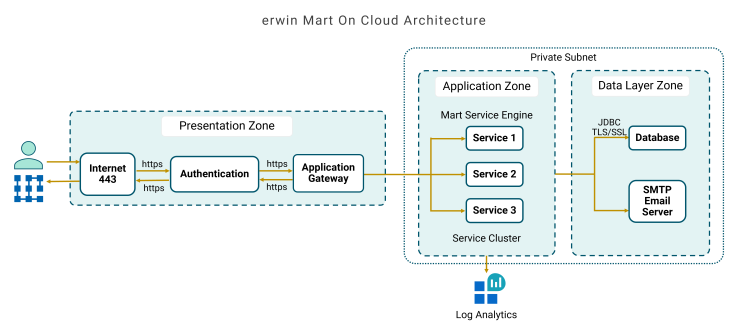
erwin Mart Portal on Cloud has a three-layered architecture consisting of Presentation, Application, and Data layers. The following diagram explains the erwin Mart Portal on cloud architecture.
Tenancy Models
On cloud, erwin Mart Portal supports two tenancy models: single tenant and multitenant. The tenancy model determines whether the on cloud instance that serves your organization is shared with other customers or dedicated to you.
- Single tenant
-
This on cloud instance is dedicated to your organization only. Use this model if your organization requires a dedicated environment instead of a shared one.
- Multitenant
-
A single cloud-based instance serves multiple customers. Each tenant's data is logically isolated, access-controlled, and not visible to other tenants.
For example, QDM is available only as a cloud service. By default, QDM uses the multitenant model, and it can be switched to the single tenant model. The following diagram explains how the multitenant model serves multiple customers from a single cloud-based QDM instance while keeping each tenant's data isolated.
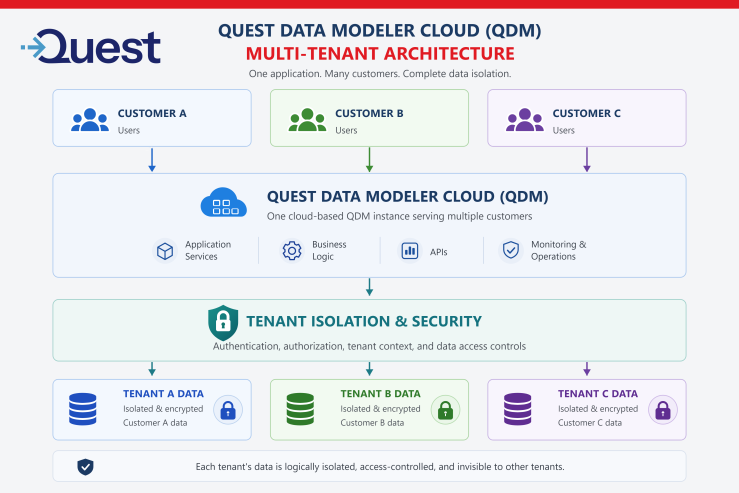
Users from each customer organization connect to the same QDM instance, which provides the application services, business logic, APIs, and monitoring and operations. A tenant isolation and security layer applies authentication, authorization, tenant context, and data access controls to every request. As a result, each tenant's data is stored separately, encrypted, access-controlled, and invisible to other tenants.